Daily Payroll Report
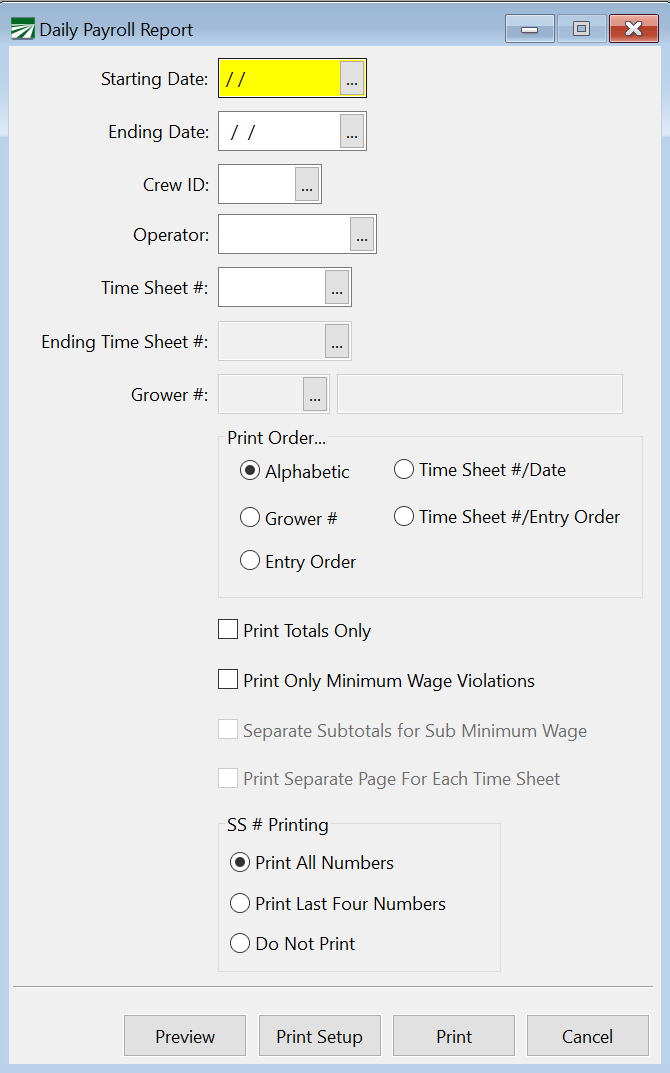
This report will organize and print a list of your daily payroll entries. You can print a report for one day (to reconcile to your time sheets) or for the entire pay period.
Starting Date / Ending Date
Enter the date range you want to report to print. If you are printing this report for one day, enter the date in both the starting and ending fields. Enter the date in the format: MM/DD/YYYY
Crew ID
To print the daily payroll report for an individual crew, enter that crew #. Leave the field blank to print the report for all crews.
Operator
If you are using multiple operators, enter the name of the operator you wish to print the report for, leave the field blank if you are not using separate operators.
Time Sheet # / Ending Time Sheet #
If you would like to print a report for a single time sheet, enter that time sheet number.
When you select Time Sheet #/ Date or Time Sheet #/Entry Order under Print Order, you can enter a range of time sheets.
Grower
This option will be available if you select Grower # under Print Order. Then, you can select a specific grower account to print.
Print Order
Select the order you want employees listed. Depending on which order you select, different options will be available for your report.
Print Totals Only
Select this box if you want the report to print totals for each employee only. If you want details on each entry, deselect the box.
Print Separate Page for Each Time Sheet
Select this option to print each time sheet on a separate page.
SS # Printing
Choose how you would like your SS#’s printed.