Generate Quarterly Electronic File
From this window you can generate Electronic Reporting files for the following states:
| STATE | TYPE OF UPLOAD FILE |
|---|---|
|
AL |
MMREF |
|
CO |
ICESA |
|
FL |
Custom Fixed Length |
|
GA |
ICESA |
|
ID |
ICESA |
|
IL |
ICESA |
|
IN |
ICESA |
|
KS |
MMREF |
|
KY |
ICESA |
|
LA |
MMREF |
|
MA |
ICESA |
|
MD |
ICESA |
|
MI |
Custom Fixed Length |
|
MN |
ICESA |
|
MO |
ICESA |
|
MT |
ICESA |
|
NC |
MMREF |
|
NE |
MMREF |
|
NM |
ICESA |
|
NV |
MMREF |
|
NY |
MMREF |
|
OH |
ICESA |
|
OK |
ICESA |
|
PA |
ICESA |
|
SC |
ICESA |
|
TN |
ICESA |
|
TX |
ICESA |
|
UT |
MMREF |
|
VA |
ICESA |
|
VT |
ICESA |
|
WI |
ICESA |
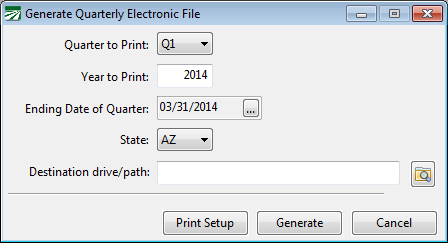
Go to Payroll > Quarterly Tax Reporting > Generate Quarterly Electronic Files.
Note Prior to printing the quarterly report, you must archive the quarterly employee totals. The quarterly state reports use the information in the quarterly archive file to print the report. Quarterly reports can be printed at any time after you have archived the employee totals. That means that you can archive the totals, close the quarter, and proceed with payroll for the next quarter.
Quarter /Year to Print /Ending Date of Quarter
Select the calendar quarter and tax year to print. The Ending Date of the Quarter will be displayed.
State
Select the State to generate from the list.
Destination drive/path
The program will automatically create a new folder for each quarter and year reported in the data folder. This keeps an archive of files that have been reported. You can change the destination if you choose.
Print Setup
A Magnetic Media report will be provided with the location of the saved file and report totals. You may click on the Print Setup to change the printer.
Generate
Click on the Generate button to create the file. A box will appear for you to verify and/or edit your company information that will be included in the report file.