Industrial Insurance Report
WA Industrial Insurance Report
The Industrial Insurance Report was designed to print on the paper Quarterly Report.
-
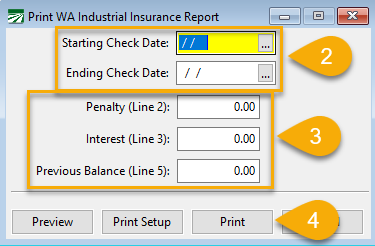
Go to Payroll > Quarterly State Report > Industrial Insurance Report.
-
In the Starting Check Date and Ending Check Date fields, enter the appropriate starting and ending dates for the quarter.
-
If applicable, enter any Penalty, Interest, or a Previous Balance.
-
Load the form in the printer and click Print.
Note Vacation, sick pay, holiday and paid leave hours are not counted when calculating the hours for this report and are not subject to the L&I (Washington Labor and Industries) tax.