Washington F&ML/LTC Export
-
Go to Payroll > Quarterly Tax Reporting > Washington F&ML/LTC Report.
-
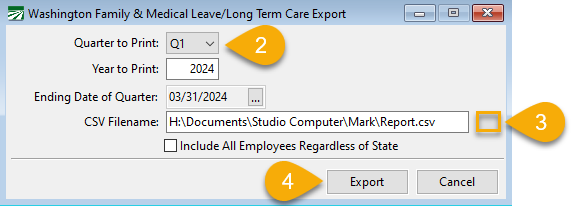
In the Quarter to Print entry, select the quarter you want to print from the drop-down menu. The Year to Print entry will default to the year you are currently in.
-
Click the button to the right of the CSV Filename field to name the file and select a location to where the file will be saved (it does not need to be the magmedia folder).
-
Click Export.
-
To upload the report, go to Washington State's Paid Family and Medical Leave website.
Note When uploading the file, the most common error results from an employee's date of birth not being included or it not being in the correct format (two-digit month, two-digit day, and four-digit year); you can manually edit this in the export file. Alternatively, you can go to the Employee file, add or correct their date of birth, and regenerate the export file.
If you get errors after uploading the file, you should be able to view an error log which will show you the item(s) that needs to be corrected.