Safe Harbor Payment Detail Reports
This option allows you to print reports listing the detail payment data that has been compile by either Employee or Grower. An additional option will generate a “preview” of what the employee statement will look like (based on the current data) before actually creating the check.
Go to Payroll > Reports > AB 1513 Reports > Safe Harbor Payment Detail Reports.
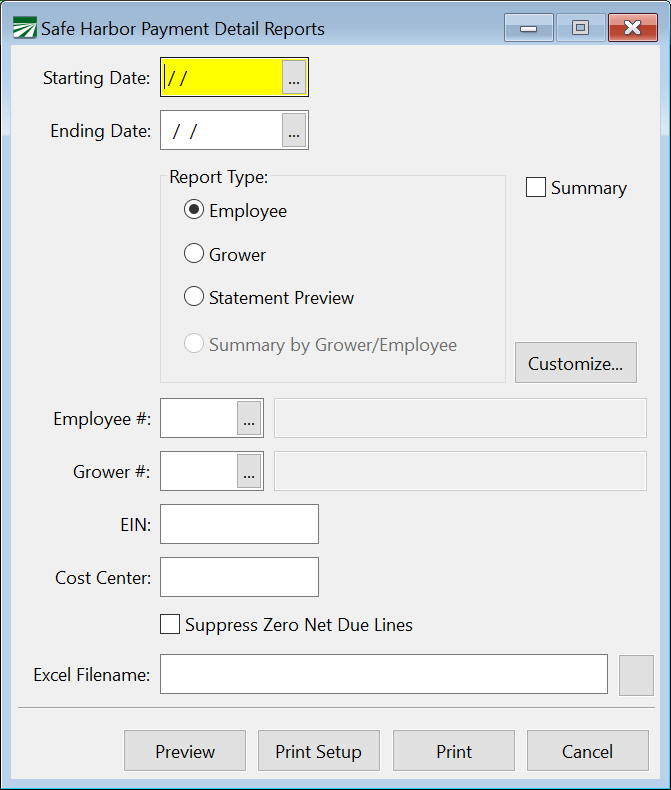
Starting Date/Ending Date
Select a date range to print the report for. This can be for the entire Safe Harbor period or for a shorter date range.
Report Type
Select either Employee, Grower, or Statement Preview.
The Employee option will print the detail information for each employee, and provide a subtotal for each employee.
The Grower option will print the detail information for each grower and then print a subtotal for each grower.
The Statement Preview will print a mockup of the employee statement. This will not include the explanation required by AB 1513 regarding what the payment is for or how the calculations were made.
Customize
Click on this button to change the columns that will appear on the reports.
Employee #
If you want the report to include only the detail records for a single employee, enter the account # or select it from the look-up. Otherwise all employees will be included on the report.
Grower #
If you want the report to include only the detail records for a single grower account, enter the account # or select it from the look-up. Otherwise detail records for all growers will be included on the report.
Excel Filename
Enter a file name to export the report data to.