California Ag Labor Report DE 4045
California Ag Labor Report Overview
We have added a new report to assist in filling out the DE 4045, the monthly California Agricultural Labor Report. Not all employers are required to file this report. The new report option will make it much easier to complete this report.
Go to Payroll > Reports > California Ag Labor Report (DE4045).
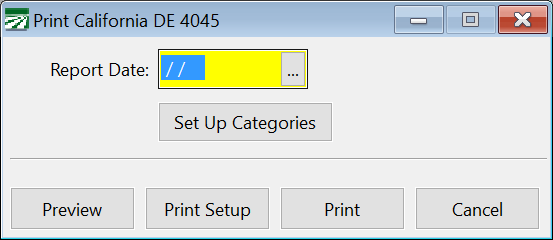
Report Date
Enter the date to print the report for. This is normally the 12th of the month that you are filing the report for. The program will automatically find all of the checks where the pay period includes the 12th.
Setup Up Categories
Click on this button to define the categories that employees are to be reported under. The category each employee is reported on is determined by the G/L number and/or the job code used on the employee’s check. The setup normally should only need to be done once, but if you add additional job codes or general ledger accounts to use on payroll checks, you might need to update the category table.
See the section below for more information on setting up your categories and how the program uses the category table.
Preview / Print
Click on the Preview or Print buttons to run the report. For each category, the program will print the number of employees and total wages for employees that received hourly wages only, piecework wages only, or both hourly and piecework wages. Transfer these totals to your DE 4045 form.
Category Setup
The DE 4045 requires you to report the number and wages of employees in five different categories. The category an employee is reported under will depend on either the general ledger account or job code (or a combination of the two) used on that employee’s check. Because every customer’s chart of accounts is different, a lookup table is needed so that you can tell the report which category each employee’s wages should be reported in.
When you click Set Up Categories, the category setup table window will open:
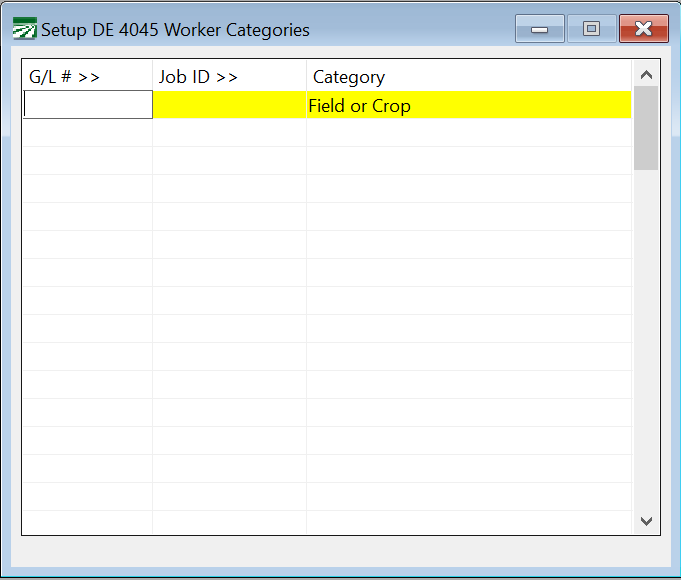
For each line in the table, enter a general ledger account number and/or a Job ID, and the category that you want employees reported under for that line. The five categories that are used for this report are Field or Crop, Livestock, Supervisory, Other, and Non-Production.
In this example, Job ID’s are not used to determine the category to report employees under, only the general ledger account number is. There are separate labor expense accounts defined for office workers (the other category), supervisors, and two different general ledger accounts used for field workers.
The DE 4045 report will check this table first to see if there is an entry where both the general ledger account and the job ID match what was entered on a check. If an entry is not found, then it will look for an entry that only has a matching General Ledger account number and no job ID. If it doesn’t find a matching entry by General Ledger number, then it will look for an entry that just has a matching Job ID and no General Ledger number.
If the program is unable to find a matching entry in this table, then it will list the employee’s name and check number on the report. Examine that employee’s check to see if you need to add a new category to this table.