How to Enter a Bonus for an “Earning Period”
Follow these steps to pay a bonus for an earning period. For example, these may be issued at the end of a harvest season for production-based goals.
All checks for the “earning period” must be completed for the pay periods before entering the bonus.
-
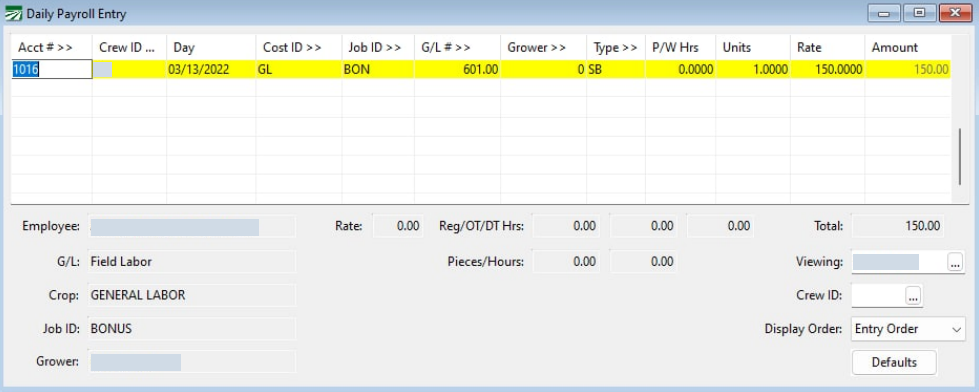
Go to Payroll > Daily Payroll Entry and enter lines for the Bonus:
-
Enter the Acct # for the employee you are giving the bonus.
-
Enter the Day you are giving the bonus.
-
For the Job ID, select the Job ID for the Bonus you are giving.
-
For the Type, select your desired wage type for the Production Bonus.
-
Enter 1 for Units, and the amount of the Bonus in Rate.
-
After the bonus has been entered in Daily Payroll, right-click in the grid and select Reports > Print Batch Report.
-
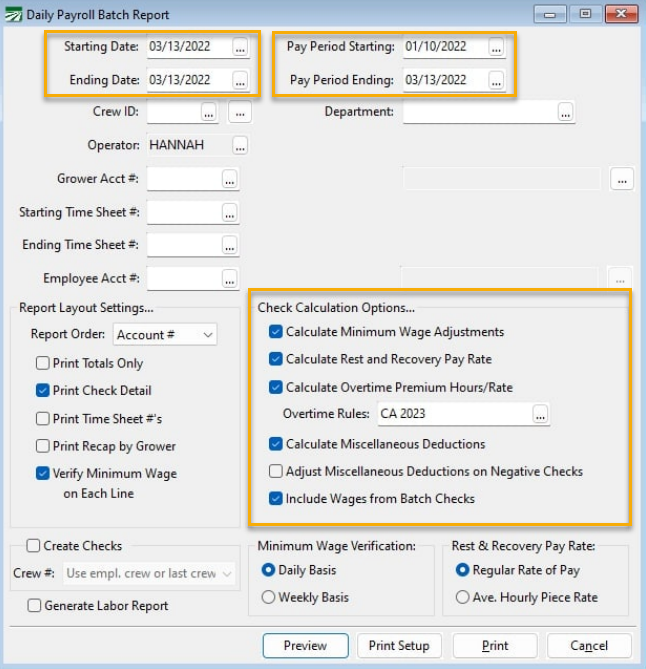
Enter the Starting and Ending Date. This will be the date you entered on the bonus in Daily Payroll.
-
Enter the Pay Period Starting and Ending Dates.
-
The Pay Period Starting date is the starting date of the Production Bonus period.
-
The Pay Period Ending date is the ending date of the bonus period and must match the date you entered on the bonus in Daily Payroll.
-
In the Check Calculation Options, select the Overtime Rules and any other options needed. Then click Preview.
-
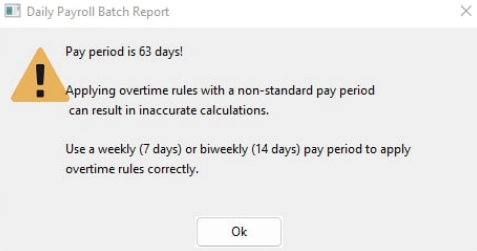
A warning will appear, this warning can be ignored for “earning period bonuses”.
-
Then, if there was overtime paid during the bonus period, the program will automatically calculate the Production Bonus Overtime Premium when checks are made.
Note These lines are not actually created yet in Daily Payroll. Entries in daily payroll may still be edited. When entries have been reviewed and you are ready to create checks, the final calculations and addition of the lines to the check record will be made.
Note Additionally, Datatech software does not currently “True Up” differences in the Rest & Recovery average rate calculation. If you will be doing production period bonuses regularly, please consult with Datatech support to discuss how to calculate additional rest & recovery wages.