Monthly Profit or Loss Statement
The Monthly Profit or Loss Report lists the total of transactions posted to each income and expense account. Like all other Financial Reports, this report is date sensitive, and can be printed for any past date for which there is data.
This is similar to the Cash Flow Worksheet; in that it prints the total of the transactions for each account. However, the report is formatted in the style of the regular Profit or Loss Report (including printing total accounts), and unlike the Cash Flow Worksheet, it only prints the Income and Expense accounts.
Go to General Ledger > Financial Reports > Monthly Profit or Loss Statement.
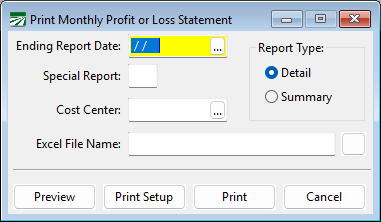
Ending Report Date
Enter the ending date for this report.
Special Report
Enter the number of the special report type to print. Leave blank if you are not using the special report feature.
Cost Center
Enter a cost center mask here, if you want to print the report for a single cost center. The cost center mask uses question marks to match digits in general ledger account numbers.
For example, suppose you use four digits for the general ledger account number, and reserve the decimal portion (.01 through .99 for up to 99 different cost centers) to specify the cost center. The cost center mask you would use would look like this: ????.01, ????.02, ????.03, etc.
If you were using a five-digit general ledger account, with the last digit specifying the cost center (giving you up to 9 different cost centers), the masks would look like this: ????1.00, ????2.00, ????3.00, etc.
Report Type
If you select Detail, all accounts will be printed. Selecting Summary will only print accounts based on each accounts' "Print on Summary Report" checkbox.
Excel File Name
If you would like to have the report exported to Excel, enter a file name here or click on the Browse button to select a file name to save the report to. The program will export the report to Excel in a spreadsheet that is formatted as close to the printed version as possible.