Equipment Setup
The equipment file can be used to keep track of equipment usage and to bill growers for equipment rental. You can enter an Equipment ID for each piece of equipment or for an equipment pool (i.e. a group of tractors). Each Equipment ID can have a separate billing rate. You can also enter billing rates on a table by job ID. This allows you to charge different rates for different tasks.
Go to Labor Reports > Equipment Setup.
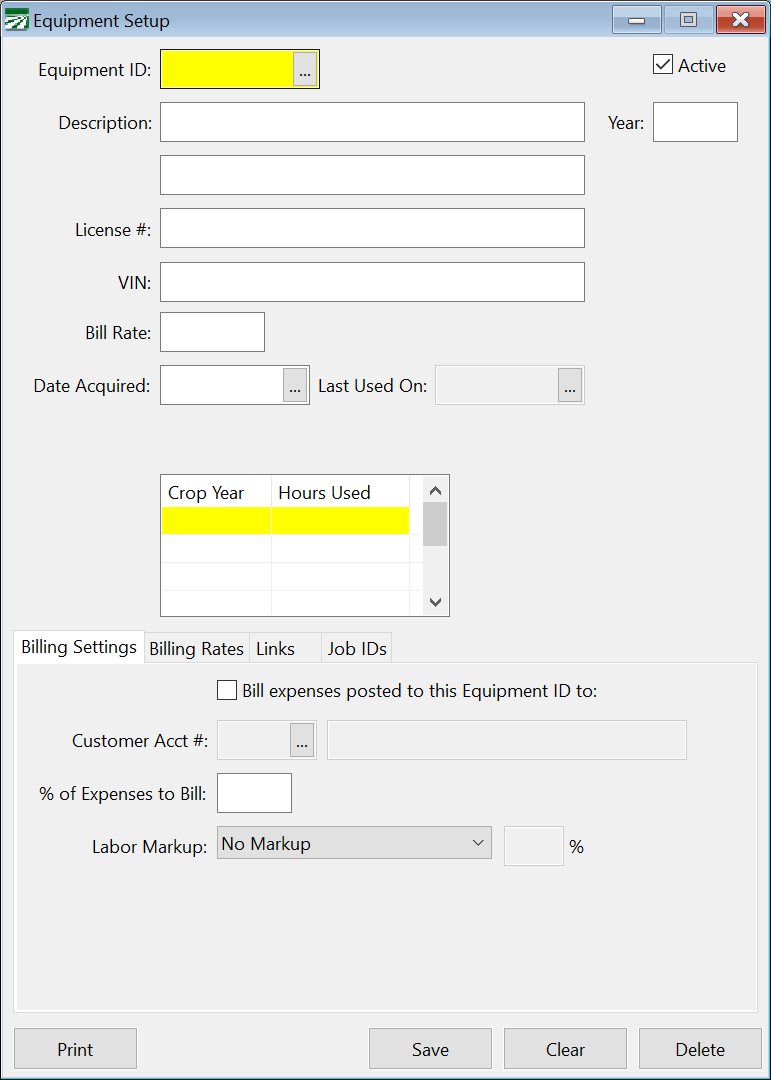
Equipment ID
The Equipment ID is a unique eight letter alphanumeric code.
Note Equipment ID’s are stored in the same file as the Crop ID’s. Because the ID’s must be unique, you cannot have the same ID’s in both files. For instance, if you have a crop ID “101”, then you cannot also have an equipment ID “101”
Active
Select this box if the equipment is currently being used. If you are no longer using an Equipment ID entry, uncheck the box and the entry will no longer appear on lookups or equipment lists.
Description
Two lines are available to enter a description for the equipment.
Year
Enter the model year for the equipment, if applicable.
License #
Enter the license # (if applicable) for the equipment.
VIN
Enter the vehicle identification number for the equipment.
Bill Rate
Enter the standard bill rate for this equipment. This will appear as the default bill rate on the payroll check entry.
If you have different rates depending on the job, you can click on the Bill Rates button to open a window where you can enter the job codes and rates. Note that the standard bill rate will still be used as a default rate if the job code you enter on a payroll check does not have a bill rate set up for it.
Date Acquired
Enter the date on which you purchased or acquired the equipment.
Last Used On
This box will display the last day the equipment was used. This information is generated by the program; nothing needs to be entered.
Crop Year/Hours Used
This table shows the history of the equipment. For each crop year that the equipment has been used, the program will show how many hours the equipment was used for.
Billing Settings
Bill Expenses Posted to this Equipment ID to:
Select this box if you want to link the use of the equipment to a customer account for billing purposes.
Customer Account #
Enter the account number of the customer to be billed for the equipment. Or look it up pressing [F4] or by clicking the lookup button.
% of Expenses to Bill
Enter the percentage of the expenses incurred you want to bill to the customer.
Labor Markup
Select from the drop-down menu whether or not to have a labor markup. If so, enter the markup percentage.
Billing Rates
In this grid, you can set the billing rates of this equipment for particular Job IDs.
Job ID
Enter the Job ID for which you want to set the bill rate.
Description
The default description for that ID will appear in this box.
Bill Rate
Enter the Billing Rate for this Job ID.
Links
Under this tab, you can link equipment to other pieces of equipment, an employee, a General Ledger account number, or a Job ID. In each entry, you can press [F4] or click the Lookup button to select an item from the Lookup window.