Minimum Wage Adjustment Options
These settings affect how minimum wage adjustments are created for employees working for multiple growers in the same pay period and who are earning piecework.
When managing minimum wage compliance for your employees, especially in the Ag industry, it is essential to ensure that workers are being paid at least the minimum wage for their labor. This means verifying the wages for each worker and making necessary adjustments. Depending on how you prefer to handle these adjustments, there are two methods available in your Datatech program: Standard and Legacy. Datatech cannot advise on which options you should use. Below we explain the options available in your Datatech Software so you can decide which options will work for your business.
Tip You should carefully review your particular situation and grower contracts to determine what settings are applicable for your operation. The options that you use may depend on advice from your labor lawyer, state labor department, or auditors. It also may depend on the state in which you are employing workers. If you have employees in multiple states, you may need to adjust settings based on each state's requirements.
How to Pool Earnings from Different Growers for Minimum Wage Adjustments
Some customers prefer wages earned for multiple growers in the same pay period to be evaluated (pooled) together when calculating minimum wage adjustments.
This means by pooling wages earned working for multiple growers, the program will not create a minimum wage adjustment for an employee that does not earn minimum wage while working for Grower A but earns more than minimum wage while working for Grower B and the overage on Grower B is enough to make up the shortage on Grower A. The minimum wage adjustment lines that are created will also be pro-rated for each line that is under minimum wage as normally happens when using the Standard method.
If you would like growers to be considered together during the minimum wage adjustment calculation, follow these steps:
-
Go to Tools > Program Setup > Payroll > Minimum Wage/Overtime tab > Verification Settings section.
-
Ensure Minimum Wage Method is set to Standard. (Pooling wages is not available when using the Legacy method.)
-
The Verification Basis entry can be set to either Daily or Weekly. (This is simply a default and can be changed on the Daily Payroll Batch Report.)
-
Go to Labor Reports > Grower Entry. On each grower, set Charge Min Wage Payments to Prorated Adjustment Only.
Note This setting will only pool wages with other growers set to Prorated Adjustment Only. You can set other growers to Yes or No, just keep in mind they will not be included in calculations for those using the Prorated Adjustment Only setting.
How to Consider Growers Individually
If you want your growers to be evaluated individually—meaning that if an employee’s overall wages meet or exceed minimum wage but they do not earn minimum wage while working for a specific grower—an adjustment will be made specifically for that grower.
This means if an employee performs piecework labor for Growers A and B and does not earn minimum wage for Grower A, but earns more than minimum wage for Grower B, the overage on Grower B does not offset the shortage on Grower A. A minimum wage adjustment will be created based on only the piecework wages for Grower A.
For growers to be considered individually, follow these steps:
-
Go to Tools > Program Setup > Payroll > Minimum Wage/Overtime tab > Verification Settings section.
-
Ensure Minimum Wage Method is set to Standard (or Legacy for some long time Datatech users).
-
The Verification Basis entry can be set to either Daily or Weekly. (This is simply a default and can be changed on the Daily Payroll Batch Report.)
-
Go to Labor Reports > Grower Entry. On each grower, set Charge Min Wage Payments to Yes. You can set Charge Min Wage Payments to No if you are not charging this grower for minimum wage adjustments.
Note When Charge Min Wage Payments is set to No, the charge for minimum wage adjustments will be created with a zero for the grower number.
 Legacy vs Standard Methods
You will need to decide which method your company will be using. The Standard method is more flexible in terms of allocating adjustments correctly for cost accounting and billing purposes. This is the default setting.
(The Legacy method remains available for customers that have always used this method and want to continue using it.)
Go to Program Setup > Payroll tab > Minimum Wage / Overtime tab > Verification Settings section.
Minimum Wage Method
Both methods determine whether or not the employee made minimum wage for piecework wages. Total wages subject to minimum wage verification are added up, and the total hours worked for those wages are multiplied by the minimum wage rate. If the calculated amount the employee should have earned working on an hourly basis at minimum wage exceeds their actual earnings, the difference is added as an adjustment to their paycheck.
Legacy:
The Legacy method is only used by businesses that have used it in the past and prefer its simpler approach. However, it can be less precise if employees work for multiple growers with varying wages. This method has a limitation when it comes to creating the minimum wage adjustment lines. It will only create one adjustment line per day / week / grower. The Crop and Job IDs used on that line were the ones on the last line item for the day / week, regardless of whether that line was over or under minimum wage.
When Legacy is selected, the only option on the Grower Entry window will be to select or not select Charge Minimum Wage Payments.
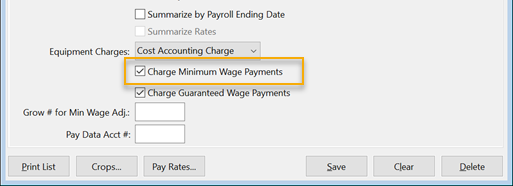
This check box controls whether or not minimum wage adjustment lines added to an employee’s check are charged to the grower. If this box is not selected, minimum wage adjustment lines will not have a grower account number. (See WARNING under Standard > a. No.)
Minimum wage verification is handled differently when minimum wage payments are charged to the grower. Normally the verification is done on all of the wages earned on either a daily or weekly basis. But when a grower is charged for minimum wage payments, wages are totaled separately for that grower and the minimum wage verification is performed on the wages and hours worked for each grower. (See EXAMPLE under Standard > c. Yes below.)
Standard:
The Standard method is used when employees are working across multiple growers with piecework wages. It is flexible and ensures that minimum wage compliance is accurately tracked and reported. It also offers more billing options, allowing you to customize how adjustments are charged to growers. This method addresses the limitation with the Legacy method mentioned above. If multiple lines on an employee's check are under minimum wage, the Standard method can:
-
Track all Crop ID / Job ID combinations of the check
-
Create multiple adjustment lines on a pro-rated basis (if selected)
-
Only create adjustments for lines where the employee did not make minimum wage.
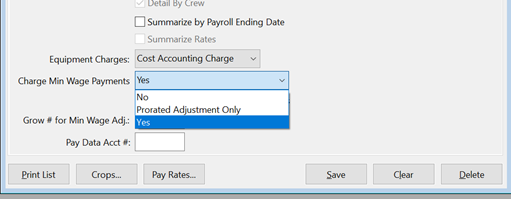
When Standard is selected, this will enable a drop-down menu on the Grower Entry window, Charge Min Wage Payments option. These options control how the adjustment is created on the employees' check and determines if the grower will be billed for the minimum wage adjustment. The options available include:
-
No: The program creates the minimum wage adjustment lines with a 'zero' for the Grower Account #. The employee is paid enough to bring their total wages up to minimum wage, but the minimum wage adjustment does not get passed on to the grower through the Grower Labor Report / Grower Invoice generated by the program. If multiple growers are set to 'No', the minimum wage adjustments for these growers will be pooled together.
Warning If minimum wage adjustments are not charged to the grower, then those adjustments will not be included in the wages reported on the Grower Labor Report. This means that even though the employee is making at least minimum wage, the Grower Labor Report does not reflect this.
-
Prorated Adjustment Only: This option is available for Labor Contractors using the Standard method that decide they would like all wages for growers pooled together for the minimum wage evaluation. (This option is not available for those using the Legacy method.)
Example By pooling wages earned working for multiple growers, the program will not create a minimum wage adjustment for an employee that does not earn minimum wage while working for Grower A but earns more than minimum wage while working for Grower B and the overage on Grower B is enough to make up the shortage on Grower A.
The minimum wage adjustment lines that are created will also be pro-rated for each line that is under minimum wage as normally happens when using the Standard method. -
Yes: The program will charge the grower for the calculated minimum wage adjustment for them individually.
Example This calculation has two primary effects.
1. If an employee works for two growers and earns more than minimum wage for one grower and less than minimum wage for the other grower, the higher wages do not offset the lower wages when determining whether or not the employee made minimum wage for the entire day / week.2. By performing a minimum wage adjustment on a per grower basis for only that grower’s wages, the Grower Labor Report will always show that the employee made at least minimum wage.
Daily vs Weekly Verification
You can select a Daily or Weekly basis verification method. Although this will be the default setting, it can always be changed when running the Daily Payroll Batch Report.
Verification Basis
You may choose to perform minimum wage verification on a daily or weekly basis.
Daily: The employee must earn minimum wage for all hours worked on each individual day. If the employee is short on any one day, an adjustment is made for that day to bring the employee's wages up to minimum wage.
Weekly: When Weekly is selected, if an employee earns below minimum wage on certain days but earns above minimum wage on others, an adjustment may not be calculated if their total earnings for the week meet or exceed the minimum wage requirement.
Detailed Examples
Background: The following examples will show an employee that worked for six different growers. We will illustrate how the Charge Min Wage Payments options work with the Standard method.
In all four examples,
-
The Standard method is used.
-
The employee worked six days, each day for a different grower.
-
The employee is going over the current 40-hour limit for overtime, but to keep the examples simple, we are omitting the overtime premium adjustments and rest and recovery time which would also be paid separately from the piecework wages.
-
Because the employee is working a total of 48 hours, the minimum wage (again excluding overtime) for the week would be $792.
For the first three examples,
-
Growers 1 and 2 are set to not bill minimum wage adjustments (No),
-
Growers 3 and 4 are set to charge minimum wage adjustments (Yes),
-
and Growers 5 and 6 are set to Prorated Adjustment Only.
In the last two examples, all growers are set to the Prorated Adjustment Only setting.
Note These examples use an 8-hour workday in California in 2025, when the minimum wage in effect was $16.50 per hour. This means that each day the employee must make $132 for an 8-hour workday when verification is done on a Daily basis.
When verification is done on a Weekly basis, the employee must make at least $660 for a 40-hour work week. An employee might make less than $132 in piecework wages on a single day, but if the employee makes more than $132 in piecework wages on another day and it is enough to cover the shortage on the other day, no adjustment is created.
Example #1
Verification Settings:
Minimum Wage Method: Standard
Verification Basis: Daily
The employee earned $120 in piecework wages each day, and gets a $12 adjustment for each day.
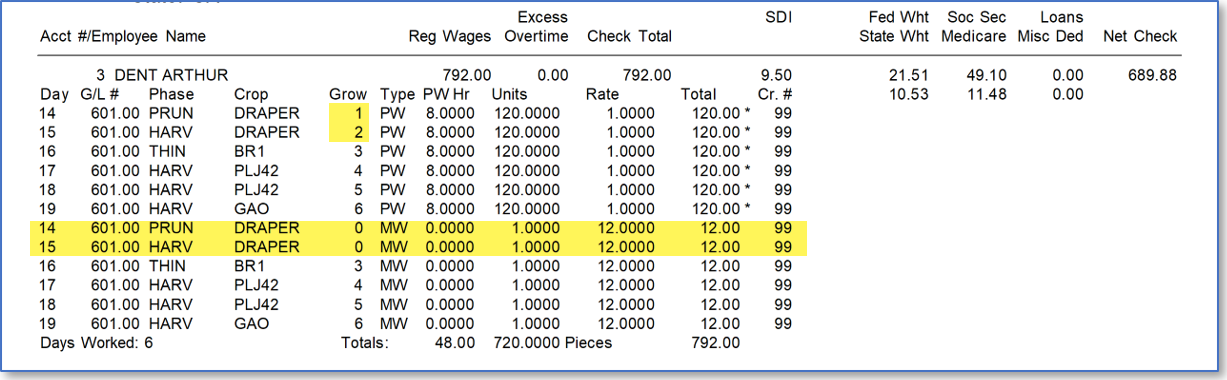
Notice the minimum wage adjustment lines created for Growers 1 and 2do not have a grower number. Remember, in this example Growers 1 and 2 have their Charge Min Wage Payments option set to No. As a result, these lines will not be billed to these growers. Also, because the employee earned the same amount each day, the adjustment needed for each day is exactly the same.
Example #2
Verification Settings:
Minimum Wage Method: Standard
Verification Basis: Daily
The employee earned $120 in piecework wages three days and more than $132 on the other three days.
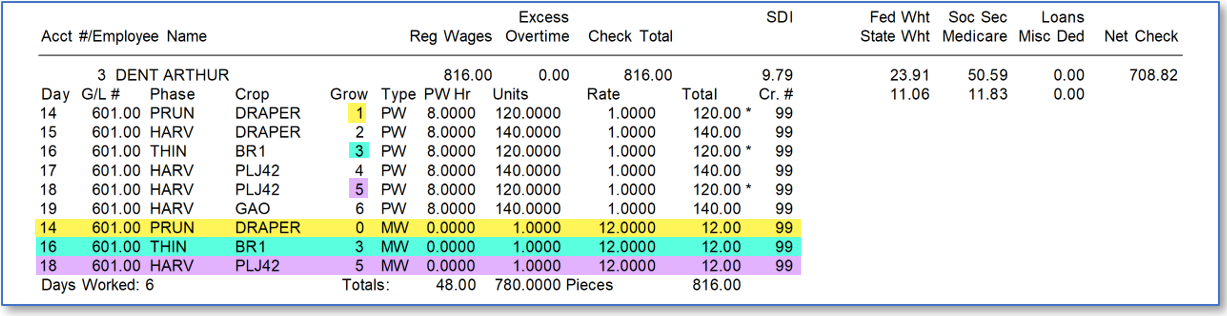
Since the verification was done on a Daily basis, the employee still gets a $12 adjustment for the three days where he only made $120. The days where the employee made more than $132 do not impact the minimum wage verification on the days where the employee was short because each day’s wages are checked on their own.
Example #3
Verification Settings:
Minimum Wage Method: Standard
Verification Basis: Weekly
In this example, we switch from the Daily to the Weekly verification basis using the same wages as in the previous example. However, note that the adjustment amounts calculated by the program change.
Note This example uses multiple growers set to each one of the Charge Minimum Wage Payments options to illustrate two points. First, it illustrates the different results from each of the settings. Second, it shows that it is actually possible to combine each of the settings in situations where you may need to use different settings on different growers.
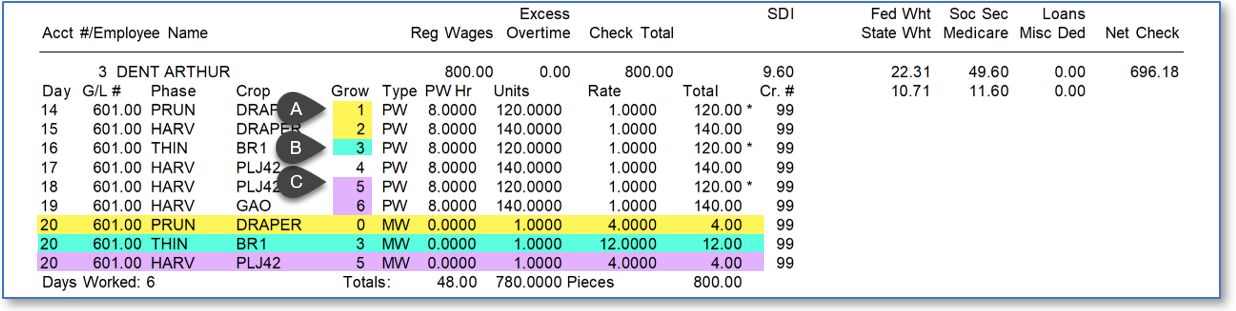
-
For the first two days, Growers 1 and 2 are set to No on Charged Min Wage Payments. This means the employee gets a $4 adjustment because the wages for the two growers are pooled and evaluated together. On the first two days, the employee earned $260 total, which is $4 short of the minimum wage for two days ($132 + $132 = $264).
-
On the third day, the employee did not make minimum wage working for Grower 3. On the fourth day the employee made more than minimum wage working for Grower 4. Growers 3 and 4 are set to Yes on Charged Min Wage Payments. This means the earnings for each of these growers are evaluated separately and that individual minimum wage adjustments are made for each grower as needed to ensure employees' wages meet minimum wage.
-
On the fifth and sixth day, the employee worked for Growers 5 and 6 who are set to Prorated Adjustment Only. The wages earned working for these growers are pooled, evaluated together, and a prorated adjustment is calculated. In this case, the charge will go to Grower 5 because the employee did not earn minimum wage when working for Grower 5. The adjustment amount is $4 because the minimum wage for two days is $264 and the employee earned a total of $260 on these two days.
Example #4
Verification Settings:
Minimum Wage Method: Standard
Verification Basis: Weekly
In this example, all of the grower accounts have been changed to use Prorated Adjustment Only.
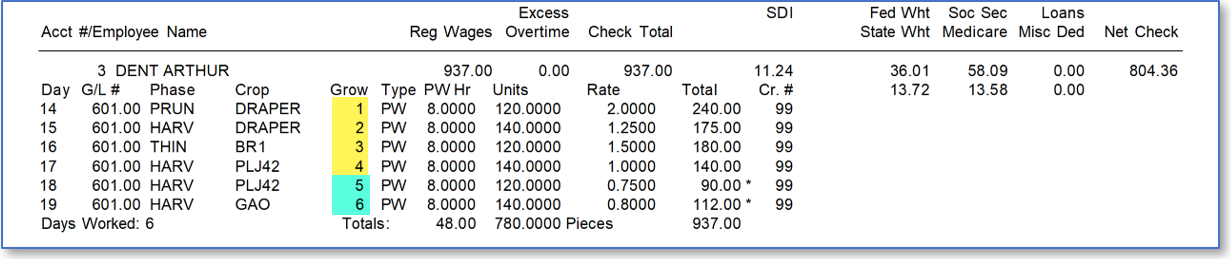
In this example, the employee makes more than minimum wage on the first four days and less than minimum wage on the final two days. On a Weekly basis, the employee made $937, which is above the minimum wage of $792 for working 48 hours. Since all of the growers are set to Prorated Adjustment Only, all of the wages for the employee are pooled together and evaluated together to see if the employee met minimum wage. In this case, the employee’s wages for all growers exceeded minimum wage, so no adjustments were made.
Example #5
Verification Settings:
Minimum Wage Method: Standard
Verification Basis: Weekly
In the final example, the employee earns more than minimum wage on the first four days, but not quite enough to cover the shortage on the last two days.
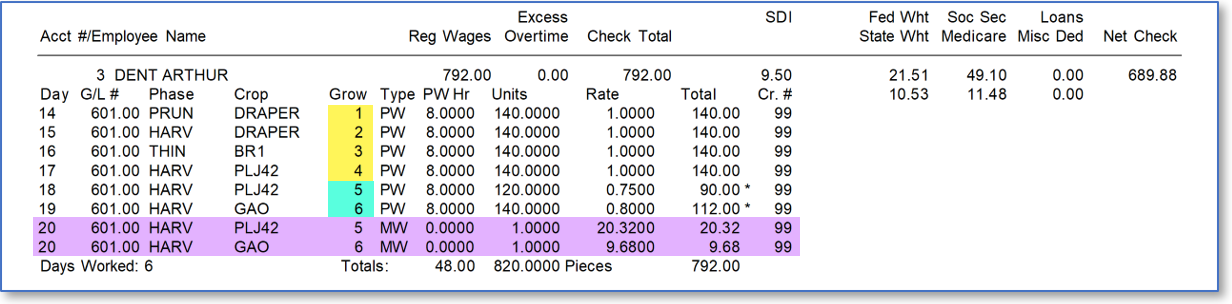
This last example is provided to demonstrate how the prorating calculation works when an adjustment amount is spread over multiple lines. The total adjustment needed to bring the employee up to minimum wages is $30. Two adjustment lines are created, and the amount is split between them. How does the program determine how much to allocate to each line?
The shortage on the fifth day is $42, and the shortage on the sixth day is $20 for a total shortage of $62. Because part of the shortage is made up by earning more than minimum wage on the first four days, only $30 needs to be added to the check to bring the total wages up to $792.
Since the fifth day represents 67.74% of the total shortage (42/62), 67.74% of $30 ($20.32), is allocated for the adjustment on the fifth day. The sixth day makes up the remaining 32.36% of the shortage (20/62), so 32.35% of $30 ($9.68) is allocated for the adjustment on the sixth day.
Example #3 (Revisited) - Grower Labor Report
The Employee Recap section of the Grower Labor Report shows the piecework wages earned by the employee while working for the grower and what the minimum wage should be for those hours worked.
IMPORTANT:Keep in mind that the Grower Labor Report only shows the hours and wages worked by employees for whom the grower is being billed.
In example three, there were three different adjustments entered for three different grower accounts. Here are excerpts from the Recap section showing how the piecework wages are reported to the grower in each case:
Grower 1
While working for Grower 1, the employee did not earn minimum wage for the piecework earnings. An adjustment of $4 was created to bring the combined wages for Growers 1 and 2 up to minimum wage.

Warning Since the minimum wage adjustment is not charged to the grower, the report only shows the piecework wages actually charged to the grower. This has always been the case; when minimum wage adjustments are not charged to the grower, the recap will not reflect the wages paid to the employee to bring their wages up to minimum wage. The grower must trust that the labor contractor has made a separate payment to the employee not reflected on the report to bring their wages up to minimum wage.
Grower 2, 4 & 6
For Growers 2, 4 and 6, the Recap looks like this:

In this case, the report shows that the employee made more than minimum wage.
Grower 3
Grower 3 was charged the minimum wage payment and the wages were evaluated on their own. A $12 minimum wage adjustment was made which brings the employees piecework earnings up from $120 to $132. The recap reflects that the employee made minimum wage while working for this grower.

Grower 5
For Grower 5, a prorated adjustment was created to bring the combined wages earned working for Growers 5 and 6 up to minimum wage. The Recap reflects this additional payment because it is charged to the grower.

In this case, the adjustment amount is the same as for Grower 1, but because it is charged to the grower, the piecework earnings total is $124 instead of $120. The recap still shows that the total piecework wages charged to the grower is under minimum wage, and the grower must trust that the labor contractor made the correct adjustments to pay the employee at least minimum wage.
Note In the future, if specific written guidance from government agencies or court decisions mandate certain calculations that are not already supported, Datatech will update its software to address the new mandates.