Check Journal
The Check Journal is a list of checks that have been entered into the accounting system. A separate Check Journal is printed for each bank account. This report, while not required, can be printed so that you have a physical printout of check entries. Some companies print the Check Journal at the end of each month to retain as a permanent paper record.
This report is similar to the Checkbook Register Report, but it provides additional information. The General Ledger accounts expensed for each check are listed, and summary totals by General Ledger accounts are printed at the end of the report.
Go to Payables > Reports > Check Journal.
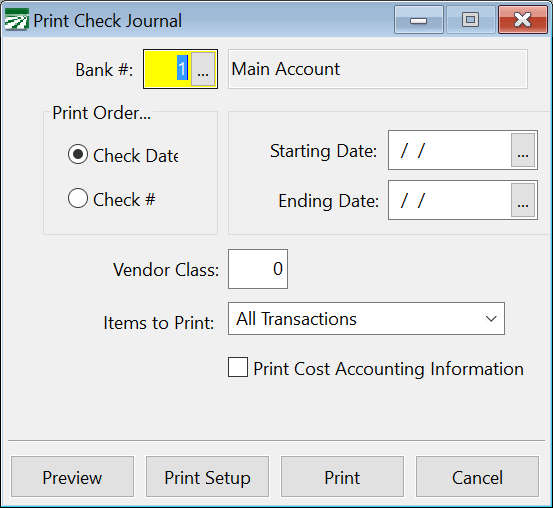
Bank #
Enter the bank account number for which you are printing the report.
Print Order
The journal can be printed by check date or check number.
Starting Date / Ending Date
Enter the starting and ending dates for which you are printing the report.
Vendor Class
Enter the vendor class you want to select for this report.
Items to Print
From the drop-down menu, select the type of transaction (i.e. All Checks, Vendor Checks, Payroll Checks, etc.) you want included in the report.
Print Cost Accounting Information
If you would like detailed cost accounting info to be printed, select this box.