Create ACH Payment File
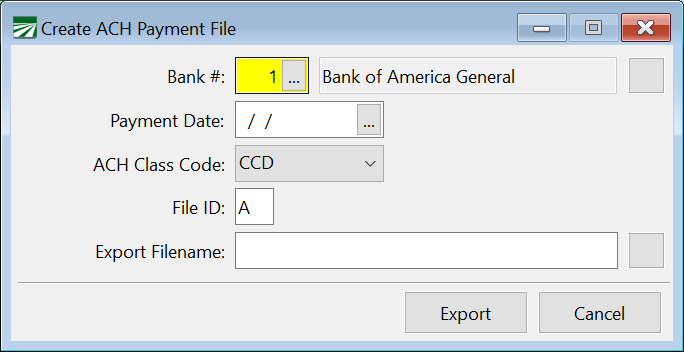
This report is used when generating an ACH export file for electronic payments to vendors.
Go to Payables > Reports > Create ACH Payment File.
Workflow
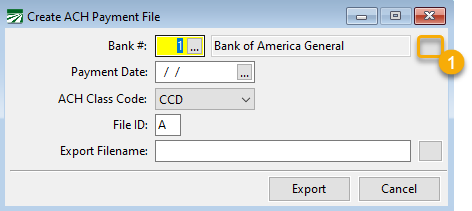
Once you have created ACH payments, you can create the ACH Payment file. Go to Payables > Reports > Create ACH Payment File.
-
To set up the bank, click the Settings button.
When you click Settings, this will open a window showing a list of Direct Deposit Settings. Information that is entered for these settings must be obtained from your bank.
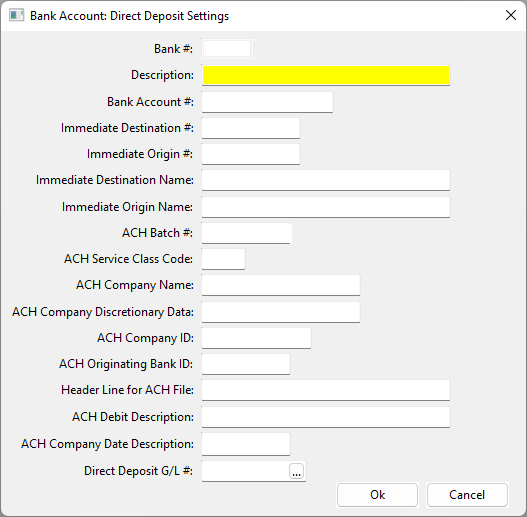
The typical entries needed for your bank are listed below; the entries not mentioned are usually not used. However, this can vary from bank to bank.
Description
Enter a Description for the Account.
Bank Account #
Enter your bank account number.
Immediate Destination
Enter your routing number for the account
Immediate Origin #
This number may be 1 + your federal ID, but the bank may also assign a different # for this.
Immediate Destination Name
Enter your banks name.
Immediate Origin Name
Enter your company name as it appears in your online banking.
ACH Company Name
Enter your company name.
ACH Company ID
This is typically entered as 1 followed by your Federal ID, or the bank can assign their own.
ACH Originating Bank ID
This is usually the first 8 characters of the Immediate Destination #, but this could vary by the bank.
Note The information required for the Direct Deposit Settings is specific to your bank and cannot be provided by Datatech. If you have any errors following the upload of your test file, please contact your bank to determine what corrections need to be made.
-
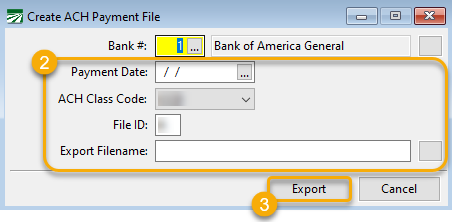
Enter the Payment Date, ACH Class Code, and the File ID. Select where you want to save the Payment File and its name in the Export Filename entry.
-
Click Export.