Bank Account Setup
Bank Account Setup Overview
Each Bank Account you enter transactions for through the Checkbook Register will need a separate entry in the Bank Account file.
To do this, go to Payables > Setup > Bank Account Setup.
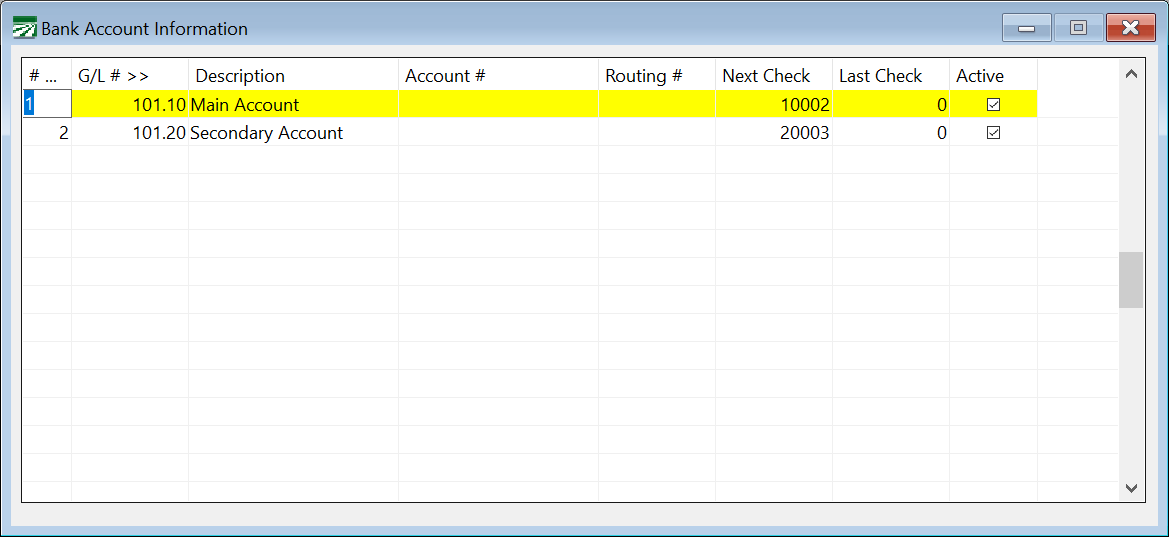
Bank #
You can use up to 99 different bank accounts. Enter the bank # in this first column.
G/L #
Each bank account must have a General Ledger (G/L) account associated with it. Enter the G/L number for the bank account here. Press [F4] or click on the column heading to activate the General Ledger Account Lookup.
Description
Enter a description here for this bank account. On the Checkbook Register and on the transaction windows, the description will be displayed along with the currently active bank account.
Account #
Enter the bank account number here. This entry is mainly for your reference. However, if you are using the Accounts Receivable option, the Cash Receipts system will print the account number you enter here on the deposit ticket.
Routing #
Enter the routing number for the bank account. This is an optional entry.
Next Check
This is the next check # to use. This is used by the Direct Expense Check entry, Payables Check entry, Payroll Check printing, and Automatic Check printing. Normally the program keeps track of the next check number to use automatically. But if this number gets out of sequence (for instance, if someone takes the top check off the printer to write a check out by hand) then you can change the next check number to use here.
Last Check
Enter the last check number here. This could be the last check number in the bin (if you print checks on a laser printer) or the last check in a stack of continuous feed checks loaded in a dot matrix printer.
When printing payroll checks or automatic payables checks, the program will stop at this check number and give you a chance to add more checks to the printer before continuing to print.
Active
Select this box for all accounts you wish to use. Deselecting this box will set an account as inactive.
Special Uses for Bank Accounts
Most of the time, the General Ledger account numbers that you use for your bank account setup will be cash in bank accounts located in the assets section of your chart of accounts. In certain cases, you may want to set up a bank account using a different type of General Ledger account.
For instance, suppose your business has a line of credit with your bank that you can draw on by writing checks linked to that account. On your chart of accounts, you would have a liability account for this line of credit. By setting up a bank account record with that liability account, you can enter all transactions associated with that line of credit through the Checkbook Register.
|
Type of transaction you need to enter:
|
How to enter it: |
|---|---|
|
Hand written check from line of credit account is deposited into checking account
|
Enter a direct expense check under the line of credit account, do not print it. Use the general ledger account for the checking account that you are depositing the check into on the line item. |
|
Electronic transfer from your line of credit to your checking account
|
Use the transfer entry to transfer funds from your line of credit to the checking account. |
|
Interest charge on your line of credit |
Enter a miscellaneous charge under the line of credit account, expensing your Interest Expense General Ledger account. |
|
Payment from your checking account for your line of credit |
If the payment was made electronically, use the transfer entry to move money from your checking account to the line of credit. If you wrote a check from the checking account, enter a direct expense check and use the liability account for your line of credit on the line item. |
If you are using the Accounts Receivable module to bill customers, there may be times when you need to charge off amounts that cannot be collected. A bank account can be set up specifically for recording the expense of charging off bad debts. Simply set up a bank account that uses the Bad Debts expense account in your General Ledger. When you enter Cash Receipts, change the active bank account to this bad debt account, and enter the cash receipts using this account. Recording cash receipts on this account will result in a debit to the Bad Debts account, recording the expense, while at the same time the outstanding amounts are removed from your open invoices in the receivables system.