Wage Detail Report
This list prints each employee's quarter to date and year to date wages and tax deductions. Print it at the end of each quarter and compare it to the totals of quarter to date Employee Earnings Records report or a quarter to date Payroll Journal to verify the totals.
Go to Payroll > Employee Lists > Wage Detail Report.
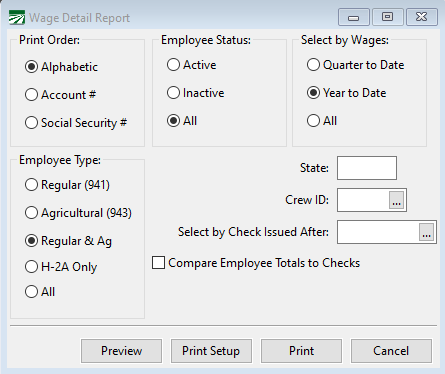
Print Order
Select alphabetical, account number, or social security number order.
Employee Type
Select Regular employees (941), Agricultural employees (943), Regular and Agricultural employees, H-2A only or All.
Note If the H-2A option is enabled in the program, selecting Regular & Ag employees will filter out H-2A employees.
Select by Wages
Select Quarter to Date, Year to Date Wages, or All.
Employee Status
Select Active, Inactive, or All
State
Enter the two-letter abbreviation for the state you wish to print
Crew #
You may print this report for one crew or all crews. If you want a list for only one crew, enter the crew number. If you want to print all crews, leave the field blank.
Select by Check Issued After
You may enter a date to print only employees who have received a check after a certain date. If you are printing a report for quarter to date or year to date wage information, leave this entry blank.
Compare Employee Totals to Checks
Select this option to have the report compare the employees’ quarter to date and year to date totals to their checks. This option is used to verify the totals. If there are any discrepancies, the amounts will be printed in red and marked with an asterisk.