PPACA: How to determine if my company is an “applicable large employer”
Part of understanding and complying with the requirements of the Patient Protection and Affordable Care Act (PPACA) requires becoming familiar with the unique definitions contained in this law. One goal of this document is to help customers understand the definitions and requirements of the law, because without this knowledge, it will be difficult if not impossible to understand how new features of the software should be applied to support your compliance efforts.
Note Datatech cannot provide legal advice about complying with the PPACA to your company, nor should this document or any other document be constituted as legal advice. The information we are providing is based on our best understanding of the law and regulations that have been released at this time, and specifically as it relates to the record-keeping and reporting requirements and how compliance with the law can be accomplished using our payroll software. If you need legal advice on complying with the PPACA or advice on compliance that falls outside the scope of using our payroll software, you should consult with a lawyer, insurance professional or other consultant that specializes in this area.
In this document, we have included direct citations from the Proposed Rule published by the Internal Revenue Service in the Federal Register on January 2, 2013. These citations appear in indented italic block quotes, and include the section from the Proposed Rule that the quote is taken from.
A PDF copy of the proposed rule may be found here:
http://www.gpo.gov/fdsys/pkg/FR-2013-01-02/pdf/2012-31269.pdf
We have also included some commentary in green blockquotes.
It is also important to realize that some aspects of the PPACA will be governed by regulations that have not been finalized, and in some cases, regulations that the government has not started writing yet. In some cases, employers will not be expected to implement procedures that do not have corresponding regulations.
What is an “applicable large employer”?
This has to do with the definition of which employers may be liable for penalties under the mandate to provide their employees with affordable health insurance coverage. Specifically:
Note “Section 4980H(c)(2) defines an applicable large employer with respect to a calendar year as an employer that employed an average of at least 50 full-time employees (taking into account FTEs) on business days during the preceding calendar year. (I.A.1)”
In short, if your company qualifies an “applicable large employer”, you must make available to your employees’ health insurance plans that meet the requirements of the PPACA (i.e. “the mandate”). Failure to do so can result in penalties being assessed against your company.
Of course, if you are not an “applicable large employer”, you may still offer health insurance plans to your employees. You are simply not under any threat of penalty if you do not.
There are several important points to note:
-
The IRS has published specific instructions about how to calculate the average number of employees employed by your company. Datatech has added a new report (the PPACA Full Time Employee Count) to the payroll system that follows these instructions. The accuracy of this report does depend on how you have entered your payroll. (These issues are addressed in the previous document, “PPACA #0: Terms, definitions and compliance”.) It may be necessary to run a “fix” option to compile some data, or you may need to manually enter some information into the system to get a 100% accurate employee count.
-
Your company may be large enough that there is no question that you are an “applicable large employer”. If this is the case, you do not need to worry about using the PPACA Full Time Employee Count report.
-
The determination as to whether or not your company is an “applicable large employer” is done each year. If your workforce fluctuates from year to year, is possible that your business may fall under the mandate one year, but not the next year.
-
If multiple companies share the same ownership, you will need to combine the employee counts from all companies to make the determination of whether you are an “applicable large employer”. One company by itself may not be considered an “applicable large employer”, but counting all of the employees of related companies together may result in each company being considered an “applicable large employer”.
Combining employee counts from multiple companies with the same ownership is outside the scope of the payroll system. The PPACA Full Time Employee Count report will give you the raw numbers for each company, but you will need to combine them together to make this determination. -
If you have a successor business, you will need to combine data from the original business and the successor business in making the determination if your company is an “applicable large employer”. The PPACA Full Time Employee Count report will need to be run for both companies, and you will need to combine the results.
-
Normally the determination of whether you are an applicable large employer is based on the entire previous calendar year’s payroll data. For 2014, the IRS has granted “transition relief”, meaning that the determination may be based on at least six months worth of payroll records in 2013. The PPACA Full Time Employee Count report may be run using a starting and ending date, which means it can be run for a full calendar year or for a shorter period of time. (See section IX.E in the Proposed Rules.)
It is not clear to us from the legislation and the regulations that have been written so far how companies that may or may not be applicable large employers should handle transitioning from being required to offer health insurance to not being required to offer health insurance and vice versa. Of course, if you are over the 50 employee limit one year, and go under the limit the next year, you can still continue to offer the same health plans to your employee (assuming your insurer will renew your coverage).
The law does not allow for any administrative period between the determination that you are an applicable large employer and when you are required to begin offering coverage. As written, the law states that the determination is based on the employee count for the preceding calendar year. If you are over the 50 employee limit in the prior year, then you are required to offer coverage starting January 1st of the current year. This could be problematic if your company is on the edge, e.g. if it is not clear until the end of the year whether you will be above or below this limit.
If you need to add coverage, some time will be needed to either make adjustments to existing health insurance plans, establish a new plan, inform employees of their coverage options, and provide time for them to make their selections. If you are going to drop coverage because your company is no longer subject to the mandate, employees may need some notice so that they can make other arrangements to obtain coverage.
It may be that the IRS will issue additional regulations that will allow employers to use shorter periods provided under the “transition relief” on an ongoing basis, or use a full year other than the calendar year (such as October to September) to make this determination while providing enough time for administrative tasks before the calendar year.
-
Finally, and perhaps most importantly for many of our customers, the limit of an average of 50 full time employees has an exception for companies that employ seasonal workers. The calculations needed for this exception are built into the PPACA Full Time Employee Count report. (Again, the accuracy of this report will depend on how you have entered your payroll check information.) You can exceed the 50 full time employee limit and still not be considered an “applicable large employer” if you employ more than 50 employees for 120 or fewer days out of the year and all of those employees over the limit are seasonal workers.
As discussed above, in the Proposed Rules, section IX.E provides for “transition relief” for employers to use a shorter time frame in calculating the average number of employees. However, the rules do not address how seasonal workers should be handled when using a shorter time frame. Specifically, should the limit on the number of days that your company can exceed the 50 worker limit be adjusted according to the shorter time period that you choose?
As an example, if you use a six month time frame (26 weeks) as your measurement period and you have a six day work week, there are a total of 156 work days in this time period. Obviously, if you use the 120 day maximum that is meant to apply to a period of one calendar year, then you can exceed the 50 employee limit for most of the measurement period.
It is clear that the 120 day maximum is meant to apply to a calendar year, but the IRS has not specified the maximum to use for shorter periods of time. Logically, the maximum could be converted to 10 days per month, and for a six month period the maximum number of days you could exceed the 50 employee limit would be 60 days; for nine months, 90 days; etc. However, since no guidance was provided in the Proposed Rule, you should be careful if you decide to use this “transition relief” method and you employ seasonal workers.
How does the new report calculate the average number of employees?
The report determines how many employees worked for each month in the calendar year. It determines whether each employee that worked in a month was a full time or a part time employee. By definition, a full time employee has at least 30 “hours of service”. Part time employees have fewer than 30 hours of service per week.
For the sake of simplicity, the IRS allows the determination of full time vs. part time to be done on a monthly basis using 130 hours as the threshold for full time status. (See II.A) Therefore, the actual rule used to determine full time vs. part time status is whether or not an employee has at least 130 hours of service in a given month.
Hours of service include actual hours worked as well as hours for which an employee is paid or entitled to payment even when no work is performed. This would include (but is not limited to) sick pay, vacation pay, holiday pay. For purposes of calculating “hours of service”, the report will include all hours entered on each line where the “Base Pay Type” of the wage type used on that line is set to Regular, Overtime, Doubletime, Piecework, Illness, Holiday, or Vacation.
Part of the total employee count is a conversion of part time employees to “Full Time Equivalents”. The hours of service for each part time employee (up to 120 hours per employee) are added together and the total is divided by 120 to determine the total “full time equivalents” (FTEs). Fractions are taken into account in this calculation for each month.
The total full time employees and full time equivalents are added together for each month. In turn the totals for each month are all added together and divided by 12 (assuming you are printing the report for a calendar year) to arrive at the average full time employees.
Obviously, you cannot run this report for a full calendar year until you have finished the payroll for that calendar year. You can run this report for the 2012 calendar year, and if your payroll is fairly consistent from year to year, this may give you an idea of your total employee count. Since you can pick the starting and ending dates, you could also run it for a twelve month period starting in 2012 and including all of the payroll completed in 2013. For instance, if you have finished payroll for May, you might run the report from June 1, 2012 through May 31, 2013.
How does the exception to the 50 employee limit work?
Employers with more than 50 full time employees are not considered to be an “applicable large employer” as long as they:
-
Do not exceed 50 full time employees for more than 120 days out of the calendar year.
-
On those days, all of the employees that are over the 50-employee limit are seasonal workers.
To make this determination, first you need to know how many employees worked on each day of the year. The only way for the program to make an exact determination of how many employees worked on each day is if there is a line item entered for each day the employee worked with a Day or Date Worked entered. If this is done, then the program can count how many employees worked on a given day, and thus determine the total number of days that the worker count exceeded 50 employees.
If the worker count exceeds 50 employees for more than 120 days, the exception does not apply, and your company is considered an “applicable large employer”. If the worker count exceeds 50 employees for 120 days or fewer, then the exception applies, and your company is not an “applicable large employer”.
A key point in the Proposed Rule is that the 120 days do not need to be consecutive:
Note In response to comments, and consistent with Notice 2011-36, these proposed regulations provide that, solely for purposes of the seasonal worker exception in determining whether an employer is an applicable large employer, an employer may apply either a period of four calendar months (whether or not consecutive) or a period of 120 days (whether or not consecutive). (I.A.6)
If the PPACA Full Time Employee Count report determines that you employed fewer than 50 full time employees, then the seasonal worker exception is moot (because your company is not an “applicable large employer”) and it does not print anything else. If however, you are over 50 full time employees, the report will print a second section where it totals the number of employees that worked on each day of the year. It is important to stress that this calculation is dependent on how you have entered your payroll. It will only generate a correct count for each day of the year if you have not combined time for multiple days on one line item, and you have not left the “Day” or “Date Worked “ blank on checks entered through the Batch Payroll Check Entry window.
The second part of the condition for this exception is that the employees over the 50 employee threshold must be seasonal workers. The PPACA leaves the definition of seasonal employees to the Secretary of Labor. Based on this understanding, most agricultural workers will be considered seasonal employees. Per the Proposed Rule, employees covered under the MSAWPA are considered seasonal workers:
Note For purposes of the definition of an applicable large employer, section 4980H(c)(2)(B)(ii) defines a seasonal worker as a worker who performs labor or services on a seasonal basis, as defined by the Secretary of Labor, including (but not limited to) workers covered by 29 CFR 500.20(s)(1) and retail workers employed exclusively during holiday seasons. This definition of seasonal worker is incorporated in these proposed regulations. The Department of Labor (DOL) regulations at 29 CFR 500.20(s)(1) to which section 4980H(c)(2)(B)(ii) refers, and that interpret the Migrant and Seasonal Agricultural Workers Protection Act, provide that “[l]abor is performed on a seasonal basis where, ordinarily, the employment pertains to or is of the kind exclusively performed at certain seasons or periods of the year and which, from its nature, may not be continuous or carried on throughout the year. A worker who moves from one seasonal activity to another, while employed in agriculture or performing agricultural labor, is employed on a seasonal basis even though he may continue to be employed during a major portion of the year.” (I.A.6)
In short, the seasonal worker status of an employee is determined by the type of work they are performing, not by when they are hired or how many hours or days they work.
To track this status, a new check box has been added to Employee entry window:

By default, no employees will have this box selected. A utility has been provided to automatically check this box based on the employee type. Employees that are set up as Agricultural (943) employees will have their PPACA Seasonal Employee box checked automatically. If you employ agricultural workers, this utility provides a quick way to set the seasonal status correctly on most employees. Ultimately it is up to you to make sure this status is set correctly for all employees.
For example, some of our customers set up all of their employees as 943 employees, including office workers who would normally be reported on the 941. (This is often done to simplify tax reporting.) In this case, you would need to deselect the seasonal status box on office workers or others who do not qualify as seasonal employees for the PPACA.
For instance, you might have a mechanic who repairs tractors and farm equipment set up as a 943 employee. In this case, the type of work performed by the mechanic may not be considered seasonal, and you would need to deselect the seasonal status for this employee.
When the average monthly employee count exceeds 50, the PPACA Full Time Employee Count report will print for each day: the total number of workers, the total number of seasonal workers, and the total number of non-seasonal workers.
You can of course, also have seasonal employees that are not agricultural employees. For instance, if you operate a store and hire additional workers for the holiday season, these employees would be considered seasonal employees. Other types of workers may also be considered seasonal workers, but it is up to you to make that determination:
Note After consultation with the DOL, the Treasury Department and the IRS have determined that the term seasonal worker, as incorporated in section 4980H, is not limited to agricultural or retail workers. Until further guidance is issued, employers may apply a reasonable, good faith interpretation of the statutory definition of seasonal worker, including a reasonable good faith interpretation of the standard set forth under the DOL regulations at 29 CFR 500.20(s)(1) and quoted in this paragraph, applied by analogy to workers and employment positions not otherwise covered under those DOL regulations. (I.A.6)
If you have salaried employees, there are additional considerations in terms of reporting the correct number of hours worked and total employee counts per day. The following section explains those situations.
Reporting Salaried Employees
For salary workers, the PPACA Full Time Employee Count report needs to determine two things: which days they worked (for the employee count) and how many hours they worked. Depending on how you enter your salary line items, the program may be able to determine both or neither:
|
|
Hours Entered |
Hours Not Entered |
|---|---|---|
|
Salary Per Day, One Line/Day |
Days Worked: Yes |
Days Worked: Yes |
|
Salary Per Day, One Line |
Days Worked: No |
Days Worked: No |
|
Salary Per Pay Period |
Days Worked: No |
Days Worked: No |
For most of these cases, the report has no way of determining which days the employee worked on and how many hours the employee worked. According to the Proposed Rule:
Note For employees not paid on an hourly basis, employers are permitted to calculate the number of hours of service under any of the following three methods: (1) Counting actual hours of service (as in the case of employees paid on an hourly basis) from records of hours worked and hours for which payment is made or due for vacation, holiday, illness, incapacity (including disability), layoff, jury duty, military duty or leave of absence; (2) using a days-worked equivalency method whereby the employee is credited with eight hours of service for each day for which the employee would be required to be credited with at least one hour of service under these service crediting rules; or (3) using a weeks-worked equivalency of 40 hours of service per week for each week for which the employee would be required to be credited with at least one hour of service under these service crediting rule
Although an employer must use one of these three methods for counting hours of service for all non-hourly employees, under these proposed regulations an employer does not need to use the same method for all non-hourly employees. Rather, an employer may apply different methods for different classifications of non-hourly employees, as long as the classifications are reasonable and consistently applied.
The number of hours of service calculated using the days-worked or weeks-worked equivalency method must reflect generally the hours actually worked and the hours for which payment is made or due. (II.B.1)
To provide a method of crediting salaried employees with hours worked and include them in the count of total workers for each day, the PPACA Full Time Employee Count report allows you to enter the number of hours that should be credited per day to salaried employees. Click on the Salary Settings button on the report window and the following window will open:
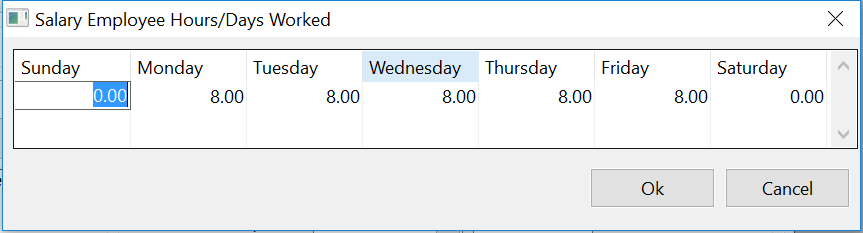
Here you can enter the number of hours worked per day for salary employees. Salaried employees will be added to the total employee count for each day that they are credited with working.
In some cases, you may have different classes of salaried employees and need to credit different employees with different numbers of hours or days worked. In this situation, enter the hours that apply to most of the employees in the Salary Employee Hours/Days Worked window. For the other salaried employees, you can enter the hours that they should be credited with on the Profile tab of the Employee entry window:
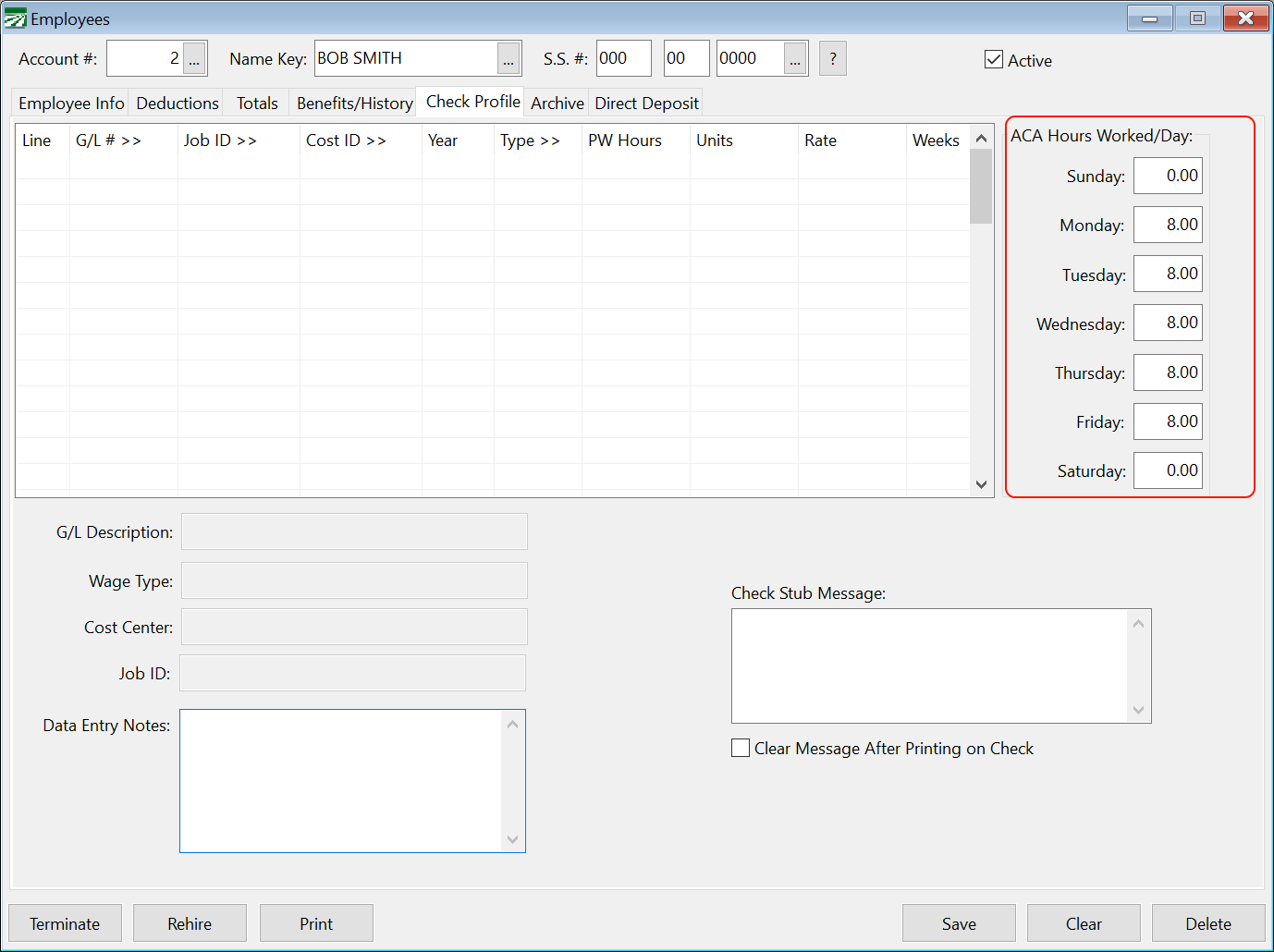
The settings entered on an employee account will override those entered on the Salary Employee Hours/Days Worked window.
You should make sure that salaried employees of the same classification all have the same hours/days entered on their accounts (per the second paragraph quoted above from section II.B.1 of the Proposed Rules.)
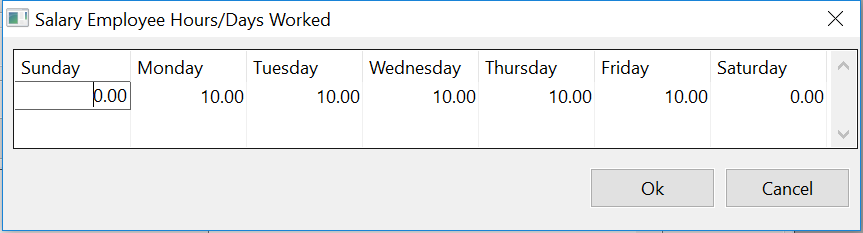
Example You have several supervisors that are paid a salary based on working ten hours on six days a week for a total hours worked of 60 hours. You also have an office worker that is paid a salary based on five eight hour days. On the Salary Employee Hours/Days Worked window, you can enter the time for the supervisors:
And on the office worker’s employee account , you can enter the time for five days worked:
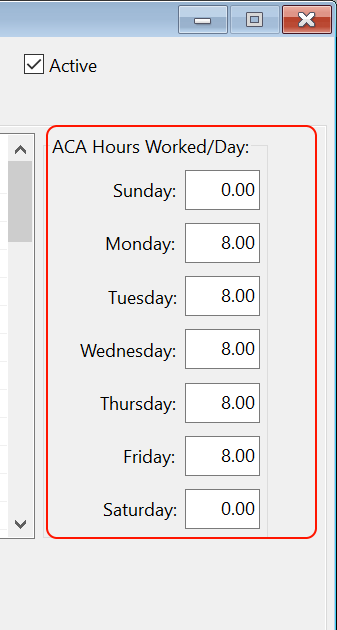
By doing this, each supervisor will be counted in the total employees that worked on Monday through Saturday for each pay period that they receive a check, and the office worker will be counted in the total employees that worked on Monday through Friday for each pay period.
Conclusion
If your company is close to the maximum limit of 120 days, you should make every effort to double check that the employee counts are correct. Unless actual hours of service are recorded and available in a time and attendance system for salaried employees, using the default hours/days worked as detailed above is the next best option for generating an employee counts by day.
It may be very important to accurately count salaried employees. While testing the PPACA Full Time Employee Count report using 2012 payroll for one customer, the report showed the 50 employee limit was exceeded on 20 days before days worked by salaried employees were factored in. But once salary employees were included, the 50 employee limit was exceeded on 116 days.