Rest and Recovery/Non-Productive Time Definitions
The Rest and Recovery/Non-Productive Time Definitions window lets you define which pay types (and optionally, combinations of Job ID’s, Cost ID’s, and G/L #’s) are used to define rest and recovery time as well as other non-productive time. This table also has a setting that controls how rest and recovery time is billed on the grower invoice for farm labor contractors.
Go to Payroll > Setup > Rest & Recovery Time.
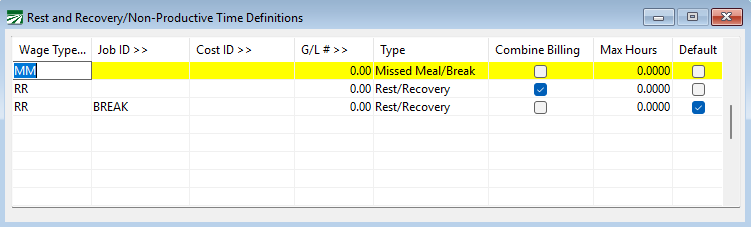
This table is used both by the Rest and Recovery Pay Rate Report and the Daily Payroll Batch to determine which line items are Rest and Recovery lines so that they can be updated with the appropriate pay rate. It is also used by the AB 1513 Safe Harbor Report to identify previously paid Rest and Recovery time as well as Non-Productive time.
Wage Type
Every entry in the table must have a Wage Type. It is best practice to set up at least one wage type specifically for breaks.
You may want to set up additional wage types for overtime/double-time breaks (if applicable), non-productive time, and heat illness prevention breaks.
Job ID/, Cost ID, G/L #
If you use different job codes, cost centers, or G/L #’s for different types of non-productive time, you can enter the applicable job ID’s.
Type
Select whether this line is a rest and recovery pay type or a non-productive pay type.
Combine Billing
Selecting this box combines rest and recovery wages for grower invoice formats that support combining those wages.
If you want to combine breaks into one total per day, enter a line with only the Wage Type used for breaks and then select the Combine Billing checkbox. If you do not include this line in your setup, individual rates paid to employees will be itemized on the grower invoice.
Max Hours
Default
Select this checkbox if you want the line to be used by the program to create breaks.