Invoice Lists
The Invoice List provides a report in order number of all sales, returns and credits, listed by order number. The order number, transaction type, ship date, invoice date, customer, and invoice amount are printed on this list.
Go to Receivables > Invoicing > Invoice Lists.
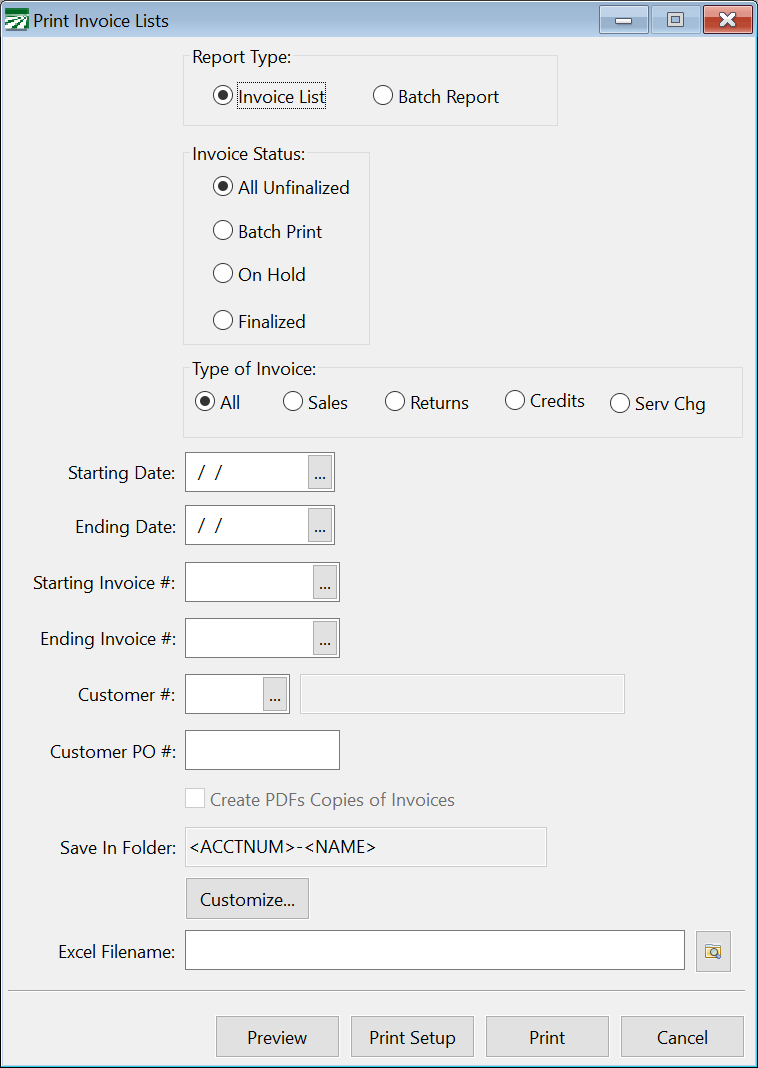
Starting Invoice # / Ending Invoice #
Enter the starting and ending invoice numbers to print.
Customer #
If you want to print orders for a single customer, enter the account number here. You can press [F4] or click on the lookup button to select a customer account from the lookup. Leave this entry blank to print orders for all customers.
Create PDF Copies of Invoices
Select this box to have the report automatically create a PDF copy of each invoice that is printed on the report. Invoices will be saved for each customer in a separate folder. The program will automatically create a folder for each customer account under the main data folder. A “Documents” folder will be created under the main data folder, and inside the Documents folder an “Invoices” folder will be created. Inside the Invoices folder, the program will create an individual file for each customer.
Save In Folder
The Save In Folder entry allows you to specify how the individual customer folders are named. You can include the <ACCTNUM>, <NAMEKEY> and <NAME> fields in this entry and the program will create individual folders for each customer, replacing these fields with each customer account’s account number and name.
Customize
Click on this button to remove or add columns to print on the invoice list.