Billing Descriptions
Setting Up Billing Descriptions
The Billing Description option allows you to set up codes that you will use when entering invoices that specify the default sale type, division, description, and price to use on the invoice.
Billing descriptions are an optional entry for invoicing, so the option must be turned on in the Program Setup before you will see the column enabled on the invoice entry window.
Go to Receivables > Setup > Billing Descriptions.

Code
The billing description code is an eight-character alpha numeric ID for each entry in the billing description file. The code is what you will enter on the invoice line item to select a billing description.
To edit an existing entry, enter the billing description code or use the lookup to select an existing billing description entry.
Description
Enter the default description for this item. This description will appear automatically in the description column on invoice entry. You can change it if you need to.
Type
Select the sale type to use for this line item.
Division
Select the division number to use for this entry.
Default Job ID
If you are using the Cost Accounting module, you can assign a default Job ID to use for this entry.
Unit Type
If applicable, you can enter a unit type (e.g. PKGS, LBS, TONS, etc.) for this billing description entry.
Cost
If you enable the “Update Inventory CGS to G/L” option in the Program Setup window, you enter a default cost here that will be used when posting the cost of goods sold amount. If that option is not enabled, entering a cost will have no effect.
Price
Enter the default price for this billing description entry. The price can be overridden during invoice entry.
Per
Enter the default Price Per setting for this entry
Note To print a list of billing descriptions, click Print at the bottom left corner of the window.
Special Billing Descriptions
The program will look for certain billing descriptions to determine the division and sale type to use when it is creating invoices automatically.
S/C
This billing description is used by the program when generating service charges. If you attempt to generate service charges and do not have this billing description set up, the program will not allow you to continue.
The following billing description codes are used by the Grower Labor Reports option when it is posting invoices to Accounts Receivable:
LCLABOR
This billing description is used for all labor.
LCEQUIP
This billing description is used for grower charges (typically for equipment) included on the invoice.
Alternatively, you can set up billing codes which match the Job ID’s used on grower charges. This allows you to post income for different types of charges to different income accounts depending on the Job ID’s used by setting up billing descriptions with different divisions/sale types. If you want to do this, make sure you do not set up a billing description called “LCEQUIP”. The program will look for this billing description before it looks for one that matches the Job ID.
LCCOMM1, LCCOMM2, LCOMM3, LCCOMM4
Each of these billing descriptions will be used for the respective commission rates entered in the grower file
LCSUI
Billing description for the SUI tax.
LCFUI
Billing description for the FUI tax.
LCFICA
Billing description for Social Security and Medicare.
LCSDI
Billing description for California SDI, Oregon and Washington FMLA.
LCWC
Billing description for worker's comp/L&I tax.
LCWBF (Oregon only)
Billing description for Worker's Benefit Fund assessment.
Note If you set up grower accounts to bill taxes and worker’s comp individually, these billing descriptions will be used for those line items. See the example below:
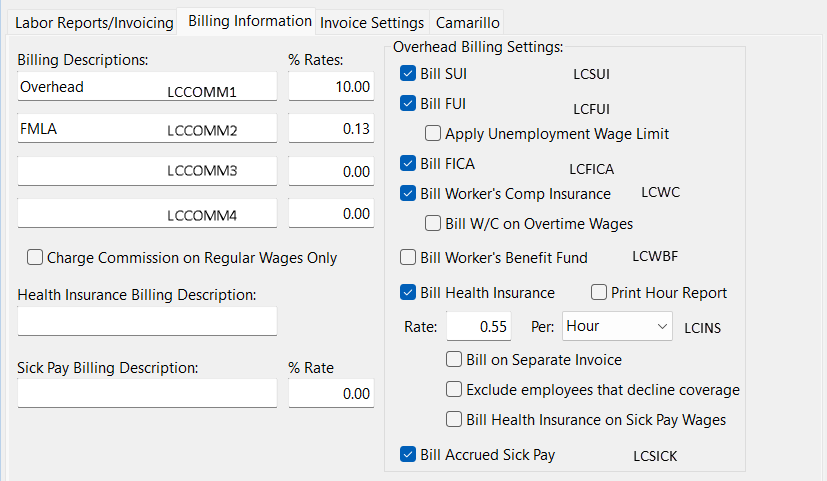
LCSICK
Billing description for sick wages.
LCSICKCO
Billing description for commission on sick pay wages.
LCINS
This billing description will be used to bill employee health insurance contributions, normally billed out on a per hour basis on invoices generated by the Grower Labor Report.
MGMTFEE
This billing code will be used for management fees billed on farm management invoices.